
As an experienced telecommunications specialist with a deep background in enterprise-grade networks and risk management, Vladislav Zaimov offers a unique perspective on the evolution of virtual collaboration. Throughout his career, he has witnessed the shift from basic connectivity to the complex, AI-driven environments we navigate today. Our conversation explores the strategic pivot from aesthetic-focused features like Microsoft Teams’ Together Mode toward high-performance, data-centric tools designed for the modern hybrid workforce. We delve into how user priorities have shifted from seeking emotional presence to demanding operational efficiency, and what these changes mean for the future of professional communication.
Together Mode was originally designed to simulate a live audience for speakers in high-profile settings. How has the shift from structured, talk-show-style presentations to routine hybrid work impacted the demand for shared virtual spaces, and what specific friction points made this layout less practical for daily communication?
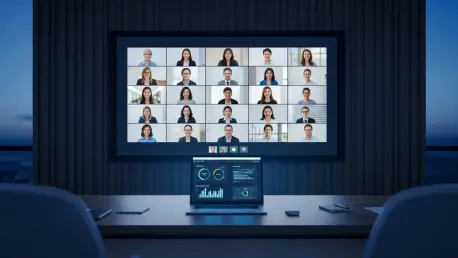
The transition from the emergency remote work of 2020 to today’s structured hybrid environment fundamentally changed how we perceive the “virtual stage.” When Teams grew from 32 million users to 145 million in just over a year, there was a desperate need for social cohesion, which Together Mode provided by placing participants in a shared digital auditorium. However, in a routine work setting, this layout often felt forced and added unnecessary cognitive load because it didn’t align with how people naturally interact during a brainstorming session or a quick sync. Users began to find the shared virtual space more of a friction point than a benefit, as it required specific configurations that simply weren’t practical for smaller, more common meetings where a standard grid is more intuitive.
Microsoft plans to prioritize video quality and the standard Gallery View over specialized immersive layouts by June 2026. What technical trade-offs occur when maintaining niche display features, and how does refocusing these resources improve the performance and reliability of multi-participant meetings for enterprise users?
Maintaining a feature like Together Mode requires significant backend resources to segment individual video feeds and render them into a unified, low-latency environment. By retiring these specialized layouts, Microsoft can redirect that computational power toward improving the core stability and visual fidelity of the Gallery View, which remains the primary way professionals interact. This refocusing ensures that meetings are easier to join and simpler to manage, directly addressing the technical fatigue many users face. For an enterprise user, a stable, high-definition 720p or 1080p grid view is far more valuable for reading non-verbal cues than a stylized but potentially laggy virtual seating chart.
AI-driven tools like Copilot are now being positioned to handle meeting recaps and real-time queries without requiring active recordings. How does this transition toward automated efficiency reflect a change in what professionals value most, and what steps should organizations take to integrate these time-saving tools into their workflows?
We are seeing a profound shift from “presence” to “productivity,” where the value of a meeting is no longer just about being there, but about what information you can extract from it. Modern professionals are overwhelmed by information, so the ability for Copilot to provide real-time answers and recaps without the storage burden of a full recording is a massive game-changer. Organizations should start by auditing their current meeting culture and identifying “information bottlenecks” where these AI tools can provide the most relief. Integrating these tools requires a move away from the mindset of 2020, focusing less on the feeling of “togetherness” and more on reclaiming the hours lost to manual note-taking and follow-up.
As Microsoft 365 subscription costs are set to rise in mid-2026, firms may need to find new ways to maintain their brand identity during calls. What are the practical steps for implementing customized backgrounds as an alternative to Together Mode, and how do these options impact social cohesion?
With the upcoming price increases for Microsoft 365 plans in July 2026, firms must be more strategic about how they use the platform’s features to maintain their corporate identity. Customized backgrounds are the most practical alternative, offering a professional and uniform look that doesn’t require the complex rendering of an immersive scene. IT leaders should deploy a centralized library of high-quality, branded backgrounds to ensure every employee presents a consistent image to clients and partners. While this might seem less “social” than Together Mode, it actually fosters a different kind of cohesion—one rooted in professional alignment and brand pride rather than a simulated physical proximity.
In the early 2020s, the priority for remote tools was fostering a sense of togetherness, whereas today the focus is on managing information overload. What specific metrics should IT leaders track to determine if a collaboration feature is actually enhancing productivity or simply acting as a cosmetic distraction?
IT leaders need to move beyond simple “usage” metrics and look at “time-to-action” data to see if a feature actually moves the needle on work. You should track how quickly participants can access meeting takeaways or how often AI-generated recaps are utilized compared to the total number of hours spent in calls. If a feature like Together Mode was being used but not resulting in faster decision-making or clearer communication, it was likely just a cosmetic distraction. In the current landscape, the most important metric is the reduction of “digital debt”—the accumulation of unread messages and missed context that these new, efficiency-focused tools are designed to clear.
What is your forecast for the future of virtual meeting environments?
I predict that by the end of this decade, the “interface” of the meeting will largely disappear in favor of invisible, AI-driven orchestration. We will see environments that automatically adjust their layout and data overlays based on the intent of the meeting, moving away from static choices like “Gallery” or “Together” mode entirely. The focus will shift almost exclusively to time reclamation; if a meeting lasts thirty minutes, the technology should ensure that the participants spend twenty-nine of those minutes on high-level strategy while the system handles all the administrative capture. Ultimately, the successful virtual environment of the future won’t try to mimic a physical room, but will instead provide a “super-powered” version of collaboration that physical presence alone cannot achieve.